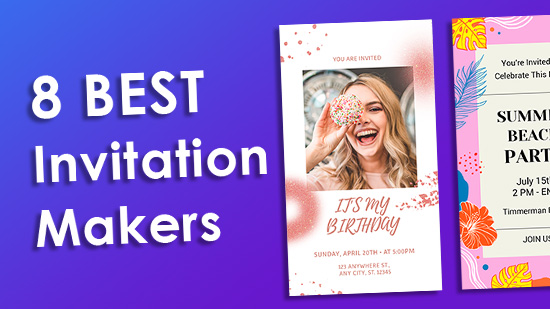
Creating a beautiful invitation used to mean hiring a designer, waiting weeks for proofs, and paying a premium for every small change. Today, that entire process has been compressed into a few clicks. Whether you are planning a birthday party, a wedding, a corporate event, or a casual get-together, the right online invitation maker can transform a blank template into something that looks polished and personal in minutes. The key is finding a platform that genuinely makes it easy to swap out text, images, and colors without a steep learning curve. This guide breaks down what to look for, which features matter most, and how to get the most out of any customizable invitation tool.
Why Customization Matters More Than Ever
Generic invitations send a subtle message: that the event was not quite worth the extra thought. Customization, on the other hand, signals care. It sets the tone before guests even arrive. A well-designed invitation tells people what kind of event to expect, what to wear, and how excited the host is about the occasion.
Beyond aesthetics, customization is also practical. When you can swap text, images, and colors yourself, you maintain control over accuracy. You can fix a typo in seconds, update a venue address without starting over, or adjust the color palette to better match a venue or theme. This kind of flexibility used to require professional design software and a fair amount of skill. Modern invitation platforms have largely eliminated that barrier.
The market for DIY design tools has grown significantly, and so has the quality of what they offer. Templates are more sophisticated, font libraries have expanded, and color customization has become far more intuitive. Understanding what separates a truly useful platform from a frustrating one will save you time and help you produce something you are actually proud of.
What to Look for in a Customizable Invitation Maker
Not all invitation platforms are created equal. Some offer beautiful templates but make it difficult to actually edit them. Others have great editing tools but a limited template library. The best platforms strike a balance across several key areas.
Ease of text editing is foundational. You should be able to click directly on any text element, change the wording, adjust the font size, switch the typeface, and reposition the text block without needing a tutorial. Drag-and-drop functionality is a strong indicator that a platform was built with non-designers in mind.
Image swapping should be seamless. Look for platforms that let you upload your own photos, replace placeholder images with a single click, and adjust image positioning within a frame without distorting the overall layout. Bonus points if the platform includes a built-in stock image library so you are not scrambling for assets.
Color customization should go beyond a basic color picker. The best tools offer palette suggestions, the ability to use hex codes for exact brand or theme matching, and the option to apply a color change across an entire design at once rather than element by element.
Top Tips for Getting the Most Out of Any Invitation Maker
Start With a Template That Is Already 80% Right
One of the biggest mistakes people make is choosing a template based purely on the overall look without checking whether the structure fits their needs. Before you fall in love with a design, confirm that it has the right number of text fields, image placeholders, and space for all the information you need. Starting from a template that is already close to your vision means less heavy editing and a more cohesive final result.
When browsing templates, filter by event type if the platform allows it. A “birthday” template and a “formal dinner” template may both be beautiful, but their layouts and typography styles will send very different signals. Match the template’s energy to your event’s tone from the start.
Use the Text Swap Feature Before Touching Anything Else
On most platforms, swapping out placeholder text first gives you the clearest picture of how your actual information will look within the design. Fill in the event name, date, time, location, and RSVP details before you start adjusting colors or uploading photos. This order of operations prevents you from getting attached to a visual look only to discover later that your text does not actually fit well.
Pay attention to hierarchy as you go. The event name or headline should visually outrank the supporting details. If the template does not automatically reflect that hierarchy once you add your own text, adjust the font size or weight manually until the reading order feels natural.
Swap Colors to Match Your Theme, Not Just Your Preference
Color psychology plays a real role in how invitations are received. Soft blush tones read as romantic and elegant. Bold primary colors feel playful and energetic. Deep jewel tones signal sophistication. When swapping colors on your invitation, consider not just what you like but what feeling you want to create for your guests.
Many platforms let you enter a hex color code directly, which is useful if you are coordinating with other event materials like table settings, signage, or a website. If you are starting from scratch without a set palette, use the template’s built-in color suggestions as a starting point and adjust from there. Keeping your palette to two or three colors will almost always produce a more polished result than using five or six.
Replace Placeholder Images With High-Quality, Well-Cropped Photos
Image quality matters enormously in printed or digital invitations. A low-resolution photo that looks fine on your phone screen can appear pixelated when viewed on a larger display or sent to a printer. As a general rule, use images that are at least 1080 pixels wide for digital invitations and even higher resolution for print.
When replacing placeholder images, pay attention to the crop. Most invitation templates use images in specific aspect ratios, and uploading a photo that does not match that ratio can result in awkward cropping or distortion. Many platforms include in-editor cropping tools. Take the time to adjust the focal point so the most important part of your image, whether that is a couple’s faces, a venue exterior, or a product shot, is centered and visible.
Take Advantage of Adobe Express for a Full-Featured Invitation Editing Experience
For users who want a robust, browser-based tool that makes swapping text, images, and colors genuinely intuitive, Adobe’s invitation maker is worth exploring. It provides access to a large library of professionally designed templates that can be fully customized without any prior design experience.
The platform allows you to replace text, upload your own images or choose from a built-in asset library, and adjust colors using a straightforward palette editor. You can also resize your invitation for different formats, whether you need a social media graphic, a printable card, or a digital file to send via email. For anyone who wants professional-quality results without the professional price tag, Adobe Express is a strong option to have in your toolkit.
Use Consistent Fonts Across All Event Materials
Your invitation is often one piece of a larger event identity that might include programs, menus, signage, and thank-you cards. Establishing a font combination on your invitation and using it consistently across other materials creates a cohesive, intentional look that elevates the overall experience.
Most invitation platforms offer a curated set of font pairings, which takes the guesswork out of typography. Typically, a display font for headlines and a simpler serif or sans-serif for body text is all you need. Avoid using more than two typefaces in a single invitation, as it tends to look cluttered rather than creative.
Download in the Right Format for Your Distribution Method
One detail that often gets overlooked until the last minute is file format. If you are sharing your invitation digitally via text or email, a high-quality JPEG or PNG is usually sufficient. If you are posting it to social media, check the platform’s recommended dimensions and export accordingly. If you plan to print the invitation professionally, you will likely need a PDF or a high-resolution file with proper bleed settings.
Many invitation platforms offer format options at the download stage, but not all of them support print-ready files by default. Confirm the export options before you invest significant time in a design, especially if print quality is a priority.
Proofread in a Different Format Before Sending
It sounds simple, but it is surprisingly easy to miss a typo or formatting issue when you have been staring at the same design for an extended period. Before you download and send your invitation, view it in a different context. Download a preview, send it to your own email, or have someone else look at it with fresh eyes.
Common errors to watch for include misspelled names, incorrect dates (especially the day of the week versus the numerical date), missing RSVP deadlines, and broken or incomplete links if your invitation includes a URL. A single proofread at this stage can save considerable embarrassment and the hassle of sending a correction.
Use Layers and Grouping Features for Precise Control
More advanced invitation platforms offer layering capabilities, meaning you can stack design elements on top of one another and control their order. This is particularly useful when you want an image to sit behind a text block, or when you want a color overlay to soften a photo without replacing it entirely.
If the platform you are using supports grouping, take advantage of it. Grouping related elements, such as a date and time block, lets you move them together without losing their relative positioning. This kind of precision control speeds up the editing process significantly once you are comfortable with how it works.
Explore Animation Options for Digital Invitations
If you are creating an invitation for digital distribution rather than print, many platforms now offer light animation features. A subtle entrance animation on the headline text or a slow zoom on a background image can make a digital invitation feel far more dynamic than a static image.
Use animation sparingly. The goal is to add polish, not distraction. A single animated element, applied to the most important part of the invitation, is typically more effective than animating everything at once. Test how the animation looks on both mobile and desktop before sending, since playback can differ between devices.
How to Share Your Invitation Across Channels
Once your invitation is finalized, the distribution method you choose will affect how your guests experience it. For formal events, a PDF sent via email still carries a level of gravitas that a text message does not. For casual gatherings, sharing directly to a messaging app or group chat is perfectly appropriate and may get faster responses.
Some platforms allow you to generate a shareable link to an online version of your invitation, which is especially useful for events with large guest lists where sending individual files would be cumbersome. Online invitations can also be updated after sending, which is a significant advantage if any details change.
If you want to track RSVPs, consider pairing your invitation with a dedicated event management or RSVP tool rather than relying on email replies, which can quickly become difficult to manage as responses accumulate.
FAQ
Can I use a customizable invitation maker for professional or corporate events?
Absolutely. Many invitation platforms include templates specifically designed for corporate settings, including product launches, conference invitations, company milestones, and client appreciation events. The same customization features that make them useful for personal occasions apply just as well in a professional context. You can incorporate brand colors, upload a company logo, and adjust the typography to align with your organization’s visual identity. The key is choosing a template that communicates formality appropriate to the occasion and editing it with brand consistency in mind. For corporate events where RSVPs need to be tracked at scale, pairing your invitation with a platform like Eventbrite can help you manage registrations and guest communications in one place.
Do I need design experience to use these tools effectively?
No prior design experience is necessary to create a polished invitation using a modern customization platform. These tools are built specifically to make the process accessible to people who have never used design software before. The template system handles most of the hard design decisions, like layout, spacing, and font pairing, so your job is primarily to swap in your own information and make aesthetic choices that suit your taste and event. If you want to go deeper, most platforms offer tutorials and help documentation that walk you through more advanced features. Even a first-time user can typically produce a professional-looking invitation within 30 minutes.
What is the difference between a digital invitation and a printable one?
A digital invitation is designed to be viewed on a screen and shared electronically, whether via email, text, social media, or a shareable link. A printable invitation is formatted for physical reproduction, typically as a standard card size, and requires a higher resolution file to ensure the output looks sharp. Some platforms support both formats from the same template, allowing you to create once and export in multiple ways. If you plan to print professionally rather than on a home printer, look for a platform that offers print-ready PDF exports with bleed and crop marks included, as these are specifications that professional printers require for accurate results.
How far in advance should I send an invitation?
The timeline depends on the type of event and how much preparation guests will need. For casual events like birthday parties or informal gatherings, two to three weeks notice is generally sufficient. For larger or more formal events, such as weddings, milestone celebrations, or destination gatherings, sending invitations six to eight weeks in advance is standard practice, and save-the-dates may go out even earlier. For corporate events, four to six weeks is a reasonable window, though high-demand speakers or guests may need more lead time. Building your invitation early gives you buffer time to proofread, finalize details, and resolve any technical issues before distribution.
Are there limitations on how much I can customize a template?
Most platforms allow significant customization, but there are usually some constraints built into the template structure. For example, certain layout elements may be fixed, font options may be limited to a curated library, and some design elements may not be editable without upgrading to a paid plan. Before committing to a platform, it is worth exploring a template in edit mode to confirm that the elements most important to you, whether that is image replacement, font selection, or color freedom, are accessible at the tier you intend to use. Premium plans on most platforms unlock considerably more flexibility, including additional templates, extended font libraries, and higher-resolution export options.
Conclusion
Finding the right customizable invitation maker comes down to matching the platform’s capabilities to your specific needs. Whether you are sending a quick digital invite for a backyard barbecue or producing a sophisticated printed card for a black-tie event, the tools available today make it easier than ever to create something that looks genuinely designed rather than obviously templated. The features to prioritize are intuitive text editing, flexible image swapping, and meaningful color control, and the tips in this guide will help you use those features to their full potential.
The investment you make in a well-crafted invitation pays off in the impression it leaves before your event even begins. Take the time to choose a template that fits your vision, customize it thoughtfully, and distribute it in a format that works for your audience. With the right platform and a clear sense of what you want to communicate, creating a standout invitation is well within reach for anyone, regardless of design background.